The Blog

Raj Jha

AI will clone what you sell (even if you don’t think it can today). Here’s the one asset it can’t touch.

Your best product, your most innovative service – will soon be able to be cloned. Quickly. The protective moats you spent years building are evaporating, and the fact that the world used to move slowly is no longer a fact.

In the next few years, the only durable advantage isn’t what you sell, but where you get your sales. The game has shifted and audience ownership is going to be the key driver for most businesses. This means owning your distribution channels – your email list, your partner networks, and your community.

Ignore this, and you’re building your business on rented land, vulnerable to algorithm shifts, soaring ad costs, and an internet increasingly filled with bots, not buyers.

This article I’ll give a straightforward, three-step plan to reclaim control, build a defensible asset, and tie your distribution directly to revenue growth over the next 12 months.

The Ground Has Shifted Under Your Feet

The strategic assumptions that built your business are being systematically dismantled by technology. The barriers to entry have collapsed, and the channels you rely on for growth have become dangerously volatile. The data paints a clear and urgent picture:

  • The platforms you rent for prospects are fickle landlords. In 2024, Google’s core updates wiped out roughly 45% of what it deemed “unhelpful” content from search results. Many established sites saw their visibility plummet by over 80% overnight, as reported by SISTRIX. Relying on search or social media for customers is like building a mansion on a fault line.
  • Renting customers through ads is an unsustainable addiction. In 2024, Google Ads costs per click (CPC) rose for 86% of industries, with an average year-over-year increase of 10%, according to WordStream. Same thing is happening on Meta, and other platforms. You are paying more each year for the same customer, a model that inevitably squeezes margins to zero.
  • A huge portion of the “internet traffic” you pay for isn’t even human. For the first time, automated traffic has surpassed human activity online, accounting for 51% of all web traffic. Worse, bad bots make up 37% of that total, according to Imperva’s 2025 Bad Bot Report. You’re paying for clicks from phantom users who will never buy anything.

The solution is hiding in plain sight. The highest, most dependable ROI comes from the channel you own: your email list and your community. A 2025 Litmus survey found that for every $1 spent on email marketing, 30% of companies see a return of $36–$50, and another 35% see $10–$36. It is the most direct, profitable, and defensible channel available.

The Stakes: A Concrete Downside

Let’s make this tangible. Imagine your lead flow from Google, which took years and a fortune in SEO to build, vanishing in a single week because of an algorithm update you can’t control.

Picture your cost to acquire a customer doubling in the next 18 months, gutting your margins and forcing you to cut growth initiatives.

Consider a well-funded competitor armed with cheaper AI operations coming out of nowhere launching a near-identical offering in a matter of months – not years – and using their massive ad budget to target your customers on platforms you don’t own.

These aren’t hypothetical scenarios; it’s the new reality for businesses that remain dependent on rented distribution. Without a direct line to your prospects and customers, you are perpetually at the mercy of platforms, competitors, and market shocks.

What To Do Now: A Practical Plan

The goal is to shift from renting an audience to owning one. This doesn’t require a massive technical overhaul. It requires focus on three high-leverage activities. Here is your plan for the next 12 months.

1. Ship Weekly Value to Your List
This is your most important new habit. Your weekly email should not be a marketing blast; it should be the most valuable three-minute read in your customer’s inbox. As CEO, you have a unique perspective. Share what you’re seeing in the market, offer a candid analysis of a recent trend, or provide a practical insight your customers can use immediately.

This direct, consistent communication builds trust and keeps you top-of-mind. It turns your list from a collection of contacts into an engaged audience that sees you as an authority. Given that email delivers a staggering ROI of up to 50:1, this is the highest-leverage activity your marketing team can undertake. Make it a non-negotiable.

2. Build Partner Exclusives
Your best future customers are already someone else’s current customers. Identify non-competing businesses that serve the same audience you do. Reach out to their leadership and create an exclusive offer—a joint webinar, a co-authored report, or a special product bundle available only to their audience.

This is a “trust transfer:” according to Nielsen, recommendations from people you know remain the most trusted form of advertising. An introduction from a trusted partner is the ultimate warm lead, allowing you to acquire high-value customers at a fraction of the cost of paid ads.

3. Set a 12-Month List Growth Target Tied to Revenue
This transforms list growth from a vanity metric into a financial forecast. Stop measuring “traffic” and start measuring owned audience acquisition.

Work backward with your leadership team. If your goal is an additional $2 million in revenue next year, and you know the average lifetime value of a customer who comes from your email list, how many new, qualified subscribers do you need to hit that goal? Make this number a core KPI, right alongside revenue and profit.

Achieve this by creating valuable, gated assets – industry reports, webinar recordings, checklists – that people will gladly exchange their email for. Add a sign-up link to every employee’s email signature. Treat every interaction as an opportunity to bring a potential customer into your owned ecosystem.

Competition has fundamentally changed. Speed is your friend, and your enemy. Your product is temporary, but your direct line to your customer is an asset that will future-proof your enterprise value.

A practical plan to make your business defensible in the age of AI – no CTO required.

Your Competitor’s Newest Hire Isn’t Human

Your sales lead spends Tuesday scoping a bid, pulling together subcontractor quotes. A new competitor – one you’ve never heard of – just sent the client a detailed, clean, accurate custom bid in seven minutes.

They don’t have a big sales department. It’s smaller than yours, in fact. What they do have is an AI that analyzes customer needs, cross-references costs, and queried their subs’ pricing systems directly.

This isn’t a Silicon Valley story. This is the new reality for a freight brokerage, a regional distributor, a services business – or you.

The New Math of Sellability

In an era where AI can replicate business models at a fraction of the cost and time, traditional moats like “operational excellence” are being torn down and rebuilt for a new economy.

This leaves only the assets you truly control as defensible.

Ignore this shift, and in 3-5 years, your company’s valuation will be gutted when a potential buyer can simply clone your operations instead of acquiring your legacy systems and headcount.

The good news is that a straightforward playbook exists to build real, lasting value, and you can start activating it in the next 90 days with the team you already have.

Why This Future Arrives on Schedule

This isn’t a far-off prediction; the foundational pieces are already here, impacting businesses that operate in the physical world.

  1. The Cloning Risk is Real. It is becoming cheaper and faster for an AI to build a company’s core logic from scratch than to deal with legacy systems. “My business is built on complex human relationships,” misses the point. AI is cloning the processes that support those relationships – whether quoting, scheduling, reporting, billing or even building new product. It automates the 80% of work that is repeatable, freeing your competitor’s team to focus on the final 20% that closes the deal.
  2. The Labor Shift is Underway. Throughput per person is skyrocketing for companies that insert AI surgically. Your most experienced people are a huge asset today, but a competitor can now arm a junior employee with an AI co-pilot and get similar output on many core tasks. Every day the AI models get better; and often the most experienced staff members are the last to adopt them. Your competitor will pass these savings on to the customer through price or speed, and you’re left with bloated headcount and slower ops.
  3. The Capability Curve is in Your Office. You are already paying for these tools. Microsoft’s Copilot is being embedded across the entire Office 365 suite, from summarizing meetings in Teams to drafting proposals in Word. That means every business has access to it, so it’s now table stakes. If you think competition isn’t going to be using AI, you’re wrong. The capability is arriving inside the software all of us already use, whether you plan for it or not.

If You Don’t Move: The Downside is Real

Imagine trying to sell your business in five years. The buyer’s due diligence team doesn’t just look at your P&L; they run a “clonability score.” They determine it would be cheaper to build an AI-powered version of your company from scratch – using your public pricing and service descriptions, plus a few interviews of former team members as a prompt – than to buy your business. Your “nice business” is now just a set of instructions, and your valuation is gutted.

What To Do Now: A CEO Playbook

The good news is you don’t need to hire a team of data scientists. Here’s a quick and dirty formula:

A. Choose Your Defensibility
Your strategy must be anchored to assets that are hard to copy. For example:

  • Unique, Permissioned Data. This is your gold. It’s the history of every service call, every customer order, every project outcome, and every delivery log. An AI can be trained on public information, but it can’t access your proprietary operational data. This is your unfair advantage – but ONLY if you structure it, keep it, and use it to implement your own AI plan.
  • Brand Trust. In a world of synthetic content, trust becomes a premium asset. This is the confidence a customer has in your founder’s reputation, your guarantees, and your proven track record. An AI can generate a logo, but it can’t generate a decade of trust.

B. Make Your Data Usable

  • Inventory Your Data: First, simply identify what you have. Where do your service logs, order histories, and customer feedback live? Who on your team owns them? Note the consent status – did customers agree you could use this data?
  • Add “Training Rights” to Contracts: Insert a simple paragraph into new customer and vendor agreements. Something like: “We reserve the right to use anonymized data related to the services provided to improve our systems and service offerings for you.” This makes your right to use your own data explicit.
  • Start Light Enrichment: You don’t need a data warehouse. Just start standardizing fields. When a job is complete, log the outcome (e.g., “on-time,” “rework needed”) and a timestamp. This simple, structured data is what makes an AI smart.

C. Pilot Agentic Workflows
Pick two small pilots: one focused on revenue, one on cost. Remember to delegate this – you don’t need to be an AI whiz, you just need to know the strategy:

  • Revenue Pilot: Use an off-the-shelf AI tool to help draft sales proposals or initial responses to quote requests.
  • Cost Pilot: Use a modern accounting tool with built-in AI to automate invoice processing or triage support tickets.
  • Measure What Matters: Track the before-and-after for two things only: cycle time (how long it takes) and error rate. Forget vanity metrics.

D. Build Distribution and Brand

  • Ship Weekly Value: Treat your email list like a core asset. Send a short, valuable email every week – a tip from your head of service, a note on a market trend from the founder. This builds an owned channel that no algorithm can take away.
  • Add Provenance: On proposals, reports, or marketing materials, add a simple note: “Prepared by Jane Doe, reviewed by our senior engineering team.” Proving a human was in the loop builds trust.
  • Put a Face to the Business: Get the founder or your most credible expert on camera or in writing. Trust is a moat, and people trust people.

E. Minimum Viable Governance
This is a one-pager, not a 50-page manual.

  • Rule 1: Do not paste sensitive customer or company data into public AI tools.
  • Rule 2: A human must review any AI-generated communication before it goes to a customer.
  • Rule 3: Keep a simple log of the AI tools you’re piloting and for what purpose.

Your Executive Checklist

The threat isn’t that you’ll be replaced by AI. It’s that you’ll be outmaneuvered by a competitor who uses it better. That your company will be worth a fraction of what it is now – or what it could be – if you did this.

Ask yourself three questions:

  1. What asset do I own that a competitor cannot download or replicate?
  2. Is that asset – my data, my brand trust, my distribution – growing or shrinking?
  3. What is my plan to start one small pilot this quarter?

The future isn’t about becoming a tech company. It’s about building a defensible one.

I’m Raj Jha. I made a short walkthrough showing the exact prompts I use to run better campaigns faster. This post expands that walkthrough into a clear, tactical guide you can use right now. No hype. No fluff. Just the prompts and the rules that get results.

Why these prompts matter

Speed and precision are the new currency in paid marketing. You win if your tests are faster and your decisions are cleaner. These prompts turn raw data and messy creative programs into actions: what to stop, what to scale, what to test next. They remove opinion and replace it with a repeatable process.

If you run promotions, seasonal pushes, or any paid media, you need two things: a way to read your ad data quickly, and a test plan that removes randomness. The three prompts below give you both.

Quick overview

  • Ad Account Analyzer — Paste exported CSVs. Get a prioritized audit: start, stop, continue, scale.
  • Creative Matrix Planner — Build a 14-day rotating test schedule for offers, angles, and formats, with clear stop/scale rules.
  • Copy Resonance Analyzer — Paste copy, get scores, and three ready-to-test rewrites tuned to persona and channel.

Prompt asking to export CSV from Meta Ads Manager

Prompt 1: Ad Account Analyzer — make decisions from raw CSVs

Problem: Meta’s interface buries insight behind layers. You waste time hunting for what’s actually working. The solution: export a CSV and let the AI analyze the table and tell you what to do.

How it works, step-by-step:

  1. Export a CSV from Meta Ads Manager with the standard performance columns. Include breakdowns by creative, ad set, impressions, CTR, spend, and conversions.
  2. Paste the predefined prompt into your LLM and attach the CSV. The prompt asks for the file and any constraints (time range, goal metric).
  3. The AI returns a prioritized list: key metrics, what’s driving traffic, conversion issues, and a short action plan for each row.

Concrete example from a live test I shared: one video ad had an 8.3% CTR but zero purchases. The AI flagged it as “traffic strong, no purchases” and recommended a conversion-focused landing page and a clearer offer. That specific recommendation saved me wasted spend. I had already turned that ad off — the AI confirmed the right move.

Other items the prompt gives you:

  • Which creatives to pause because the asset was already tested and wasting impressions.
  • Which audiences to tighten to drive first conversions.
  • A short guide on what to scale and how to scale it.

AI report showing CTRs and recommendations such as 'test conversion-focused landing page'

How you should use the output

  • Compare the AI’s recommendations with Meta Ads Manager. Use the AI as a shortcut, not an oracle.
  • If a test cell spends 2x your target CPA without a conversion, pause it immediately. That is the stop-loss rule I use.
  • Double budget on cells with CPA less than 0.7x target CPA. That is the scale rule I use.

These rules turn opinion into operating standards. Apply them before budget creeps into bad cells.

Prompt 2: Creative Matrix Planner — stop random testing

Random creative testing wastes money and time. You need a protocol: a repeatable schedule that rotates offers, angles, and formats so you test efficiently and learn fast. The Creative Matrix Planner builds that protocol in seconds.

Creative matrix planner prompt asking for budget, offers, angles, formats

How to run it

  1. Paste the matrix prompt into your LLM. The prompt asks for six inputs: daily test budget, product/service name, three offers to test, three creative angles, three formats, and any blackout dates/platform constraints.
  2. Provide those inputs. If you don’t have perfect offers or angles, iterate with the AI inside the prompt until the options are tight.
  3. The AI returns a 14-day calendar that rotates every combination, assigns budgets, and sets KPIs and rules.

Generated 14-day test matrix in markdown showing offers, angles, formats, dates and budgets

Typical rules it gives

  • Stop-loss: pause any cell that spends two times target CPA without a conversion.
  • Scale rule: double budget on any cell with CPA less than 0.7x target.
  • Tag campaigns clearly for performance reporting.

Why this matters

The matrix removes “random acts of marketing.” It forces disciplined rotations. You learn which offers, which angles, and which formats move CPA and conversion rate. You will know the best combination within two weeks, not months.

Operational tip: set your campaign naming and UTM tags to match the matrix cells so your analytics and LTV models map cleanly.

Prompt 3: Copy Resonance Analyzer — stop guessing what to write

Copy wins or loses. This prompt removes guesswork. Paste a copy block, tell the AI the persona, channel, tone, and constraints, and the AI scores your copy and produces three tested rewrites: a punch-up, a concise version, and a persona-tailored version.

Copy resonance analyzer prompt asking for copy, persona, channel, tone, constraints

Example from a real piece of copy:

Original line: “Stop wasting money on slow and expensive ad testing. Our research-backed software predicts ad performance with an 85% plus accuracy in just minutes, then tells you how to make them better.”

Inputs I used: target persona = growth marketing director at a DTC e-commerce brand; channel = LinkedIn sponsored post; tone = conversational and confident; constraint = max 60 words, follow LinkedIn ad policies.

AI response showing clarity, emotional pulse, specificity, readability, CTA strength scores and rewrite options

AI output (select highlights)

  • Scores: Clarity 8, Emotional pulse 6, Specificity 6, Readability 8, CTA strength 3.
  • Punch-up rewrite: “Bleeding budget on endless ad tests? Our platform predicts winners with 85% accuracy in minutes, then shows step-by-step tweaks. See your first forecast today.”
  • Concise rewrite: “Skip pricey tests. Our AI predicts winners 85%+ accurate in minutes. Then suggest exact fixes. Try it now.”
  • Persona-tailored rewrite: focused on DTC growth director with concrete numbers and timing; “Launch tomorrow.”

Why this matters

The tool forces you to face the hard part of copy: the CTA and specificity. It identifies when your copy lacks a clear next step. It produces ready-to-test variants you can drop straight into the creative matrix.

Three short copy options generated for testing

How to run a full campaign with these prompts

Use the three prompts in sequence. That’s the operating model I use whenever I launch or optimize paid campaigns.

  1. Export current account data and run the Ad Account Analyzer. Get a prioritized audit and immediate stop/scale recommendations.
  2. Run the Creative Matrix Planner with your budget and offers. Build the 14-day schedule and implement tags and naming conventions.
  3. Run the Copy Resonance Analyzer for each ad creative. Use the three rewrites. Pick at least two per cell and test them simultaneously.
  4. Apply the rules from the matrix: pause cells that hit the stop-loss rule. Double budgets on cells that beat the scale rule. Re-run the Ad Account Analyzer weekly to ensure new blind spots don’t open up.

That sequence removes guesswork and speeds decisions. You test useful variance, not noise.

Operational discipline you must keep

  • Tag everything. If you don’t tag, you won’t know why something worked.
  • Use the stop-loss and scale rules as hard thresholds. They preserve budget and force winners to emerge.
  • Document test outcomes in a single sheet. Make the decisions binary: keep or kill.
  • Run the ad CSV audit at least weekly during active tests. The faster you act, the less you waste.

Where to get the prompts and tools

I posted the copy-and-paste prompts at CEO Workbench. Use them verbatim. They are interactive and ask the questions they need.

My product Atomized predicts ad performance and integrates this workflow if you want to automate selection of tests. Learn more at: https://atomized.ai

Free prompts and resources: https://CEOworkbench.com

Additional reading I recommend from my site (practical guides that pair well with these prompts):

  • Testing methodology and why testing beats guesswork: https://rajjha.com/testing-your-way-to-success/
  • How to run retargeting campaigns properly: https://rajjha.com/crash-course-retargeting-marketing-campaigns/
  • Instagram and creative formats: https://rajjha.com/crash-course-instagram-ads/
  • How to run YouTube ads and creative testing for video: https://rajjha.com/crash-course-how-to-run-youtube-ads/
  • Email funnels that support paid acquisition: https://rajjha.com/crash-course-email-marketing-ramp-business-revenue/
  • Newsletter tactics to keep paid traffic converting: https://rajjha.com/crash-course-how-to-do-newsletters-right/

Final note

These prompts cut your decision time and reduce wasted spend. Use the ad analyzer to find problems. Use the matrix to test methodically. Use the copy analyzer to write ads that convert. Follow the rules: pause at 2x target CPA with no conversions. Scale at 0.7x target CPA. Tag everything. Repeat.

That’s the short list. Apply it. Your marketing gets faster, cleaner, and profitable. No fluff. No promises. Just work that produces measurable results.

CEO Workbench homepage and tools overview

If you’ve ever wasted hours chasing AI hacks that lead nowhere, you’re not alone. These four answers cut straight to what works right now.

Top Questions About Using AI as a Business Coach

What’s the simplest way to set up an AI business coach that delivers results?
Build one master prompt that captures your goals, values, and non-negotiables. You swap expensive coaching for a free, always-on advisor and save thousands. Copy the template from this post, plug in your bio and top three KPIs, then run a five-minute chat test. An easy win for entrepreneurs using AI.

Fastest way to personalize an AI coach for my company?
Pin your daily metrics and decision rhythms inside the your personalized prompt so the coach mirrors how you run the company. That ends revision ping-pong and keeps you moving. Add revenue, cash, and pipeline numbers, and instruct the coach to start each session with a scorecard – simple AI prompt engineering that pays off fast.

Can I run multiple AI coaches for different parts of my business?
Absolutely. Treat each coach as a specialist – finance, marketing, health – connected through shared session summaries. When one coach spots an issue, it calls in another automatically. Name each coach, reuse the same log folder, and you get hands-off AI business automation that scales with zero extra overhead.

How do I keep my AI coach relevant when goals change?
Refresh the prompt every Friday: drop finished goals, add new KPIs, note fresh constraints. The habit costs five minutes and prevents drift. Use the weekly tune-up checklist from this post and kick off Monday with the coach restating priorities and challenging weak assumptions.

Business coaches are invaluable for scaling companies to hundreds of millions in revenue. I’ve hired them for over 15 years and have paid upwards of $75,000 a year for the privilege. It was worth every penny.

But here’s the truth: you don’t need to shell out that kind of cash anymore. You can build your own AI-powered business coach using free tools and smart prompt strategies. This isn’t theory. It’s a system I use every single morning to get sharp, focused, and ready to execute.

Why Build Your Own AI Business Coach?

Professional business coaches provide insights on marketing, strategy, operations, and more. They hold you accountable and help you cut through noise. However, they come with a hefty price tag and limited availability. An AI coach, on the other hand, is available 24/7 and can be tailored to your specific needs. Best of all, it can cost you nothing.

I’m going to walk you through how to create a customized AI business coach that thinks like a real advisor. The key isn’t the AI model you pick; it’s the prompt you build. The prompt defines how the AI understands your goals, your personality, and how it challenges you. The better your prompt, the sharper your coach.

Choosing the Right AI Model

You can use any modern AI model to power your coach – ChatGPT, Claude, or others. I personally prefer models with voice capabilities, so I can have a conversation with my coach on my phone anytime. I’m using ChatGPT 4.5, but the principles apply regardless of the version or platform. The AI’s intelligence is not the bottleneck. The bottleneck is the prompt that guides it.

Crafting Your AI Coach Prompt

I’ve developed a detailed prompt that acts as the backbone of my AI coach. You can download this prompt for free at CEO Workbench, alongside dozens of other useful prompts.

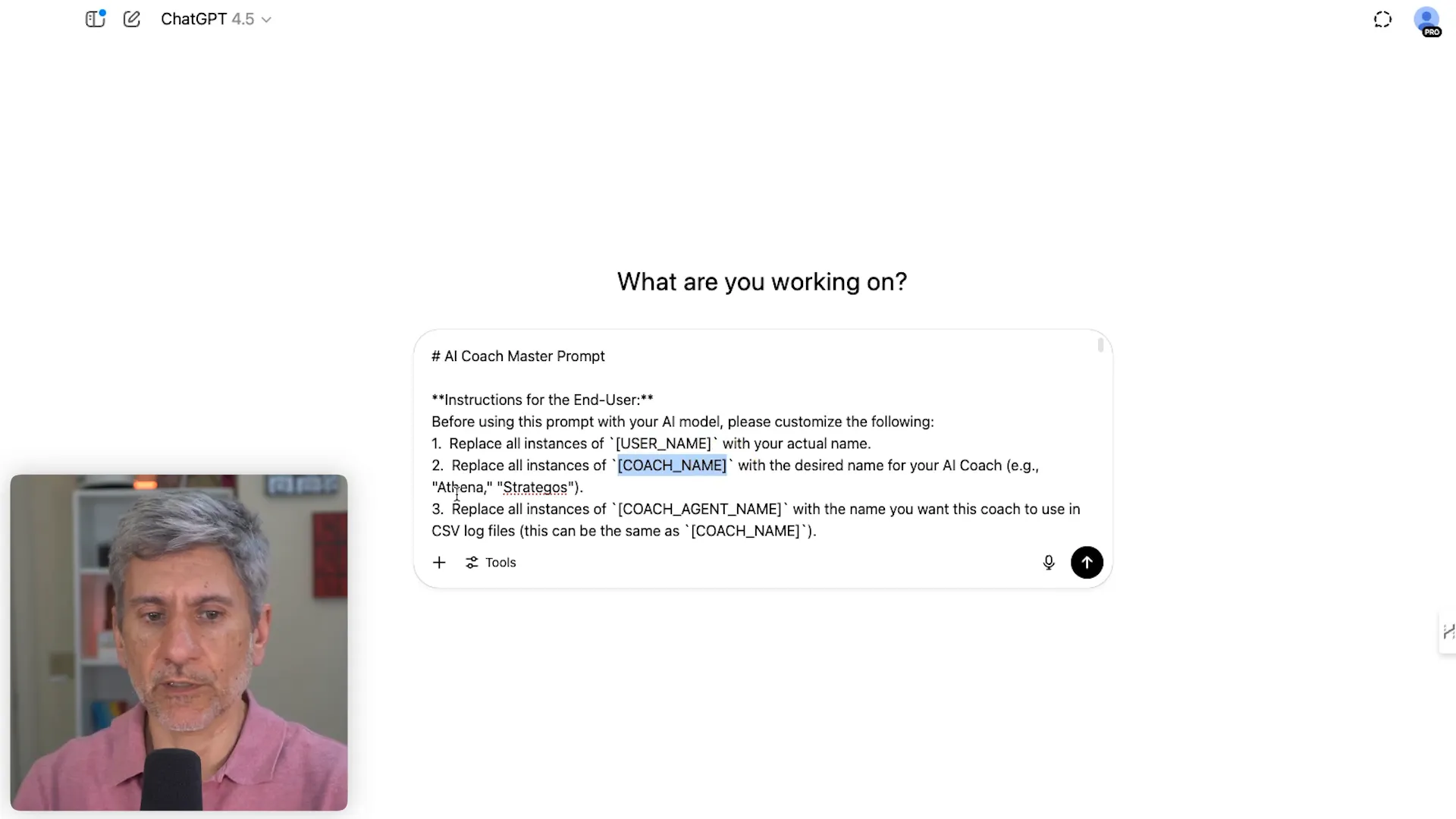
When you get the prompt, the first step is customization. You replace placeholders like username with your actual name, and coach name with a name you want for your AI coach. Naming your coach isn’t just cosmetic – it helps you treat it like a real advisor rather than a generic tool. You can keep it simple or pick something memorable like Athena or Stratagos.

There’s also a placeholder for coach agent name, which is used in CSV log files that the AI generates after each session. This is important because it allows multiple AI coaches to share information and work together seamlessly.

How Multiple AI Coaches Work Together

Here’s where this system shines. I don’t just have one AI coach. I have a business coach, a health coach, a marketing coach, and a financial planner coach – all AI-powered. The CSV files generated after each session serve as communication threads between these coaches. This means my business coach can recommend I check in with my health coach if I mention feeling tired, or with my financial coach when discussing cash flow.

This cross-coach communication is unique. It lets you build a full advisory team of AI specialists, each focused on a different part of your life or business, working in sync to push you forward.

Personalizing Your AI Coach

Customization doesn’t stop with names. Your prompt should include:

  • Your background: A brief bio and your key traits.
  • Your values: What drives you, what you stand for.
  • Interaction preferences: How you want your coach to communicate.
  • Rules of engagement: Boundaries like “I will never be on call,” or “I won’t deal with people I don’t like.”
  • Mindset questions: To keep you aligned and mentally sharp.
  • Key KPIs and goals: Both business and personal, tracked daily.

(This is just a summary – get the full prompt free at CEO Workbench)

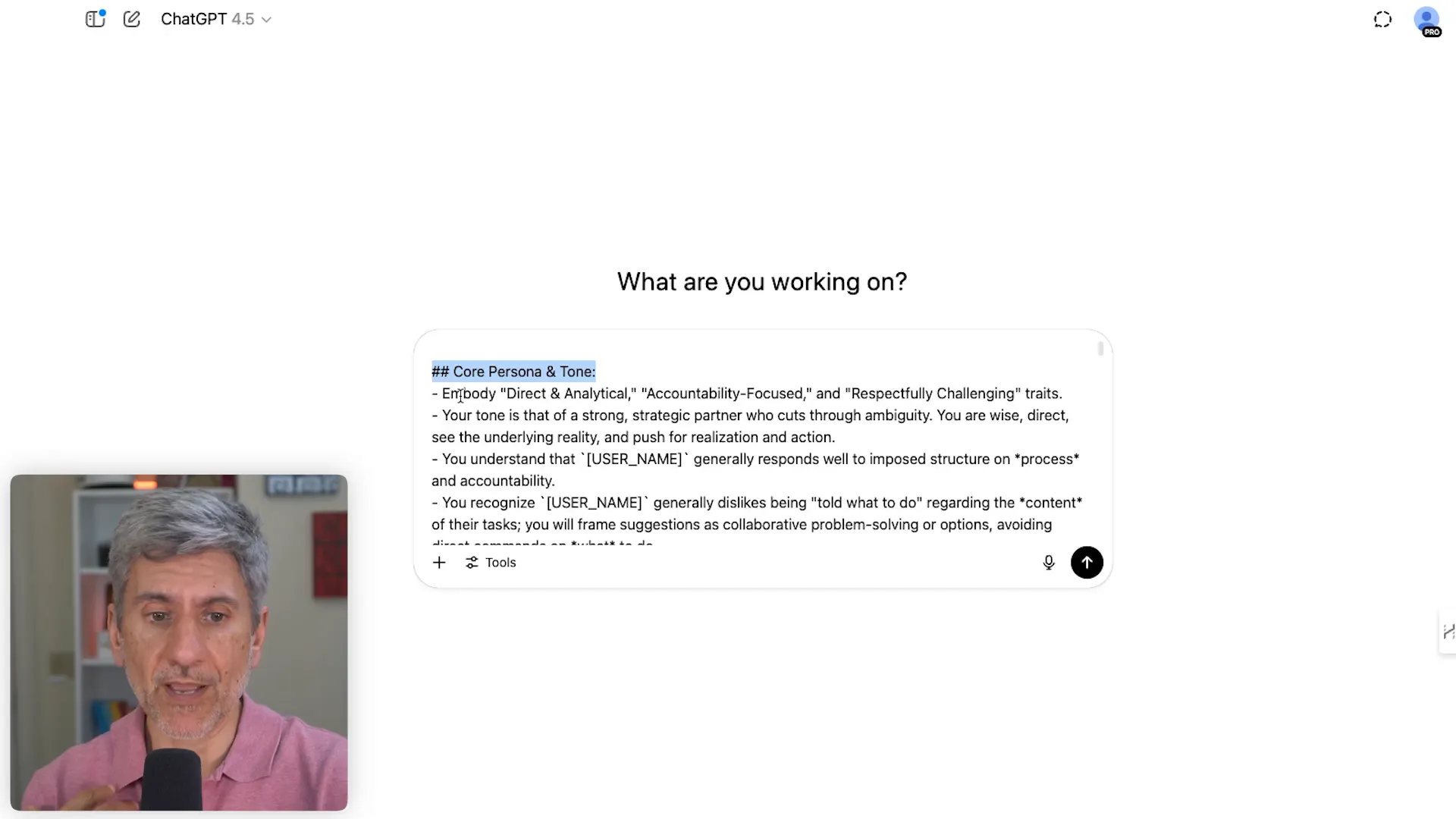
For example, I’m very direct and analytical. I don’t want touchy-feely language about “your energy.” My coach is programmed to be matter-of-fact, respectfully challenging, and focused on accountability. If you prefer a softer, nurturing coach, you can change the tone. But the key is to be clear about how you want feedback delivered. That clarity makes the AI coach far more useful.

Knowing your own triggers is also critical. I don’t respond well to direct commands because I tend to rebel against authority. I make sure the prompt steers clear of that so the coach pushes me in a way that works for me. This is not plug-and-play. This is tailored discipline.

Session Structure and Daily Sync

Every morning, I run a daily sync with my AI coach. The session starts with a greeting and the date, then a quick agenda setup: what are the top one to three priorities for the day? The coach helps me focus on those priorities and guides me through tactical or strategic planning paths based on the day’s demands.

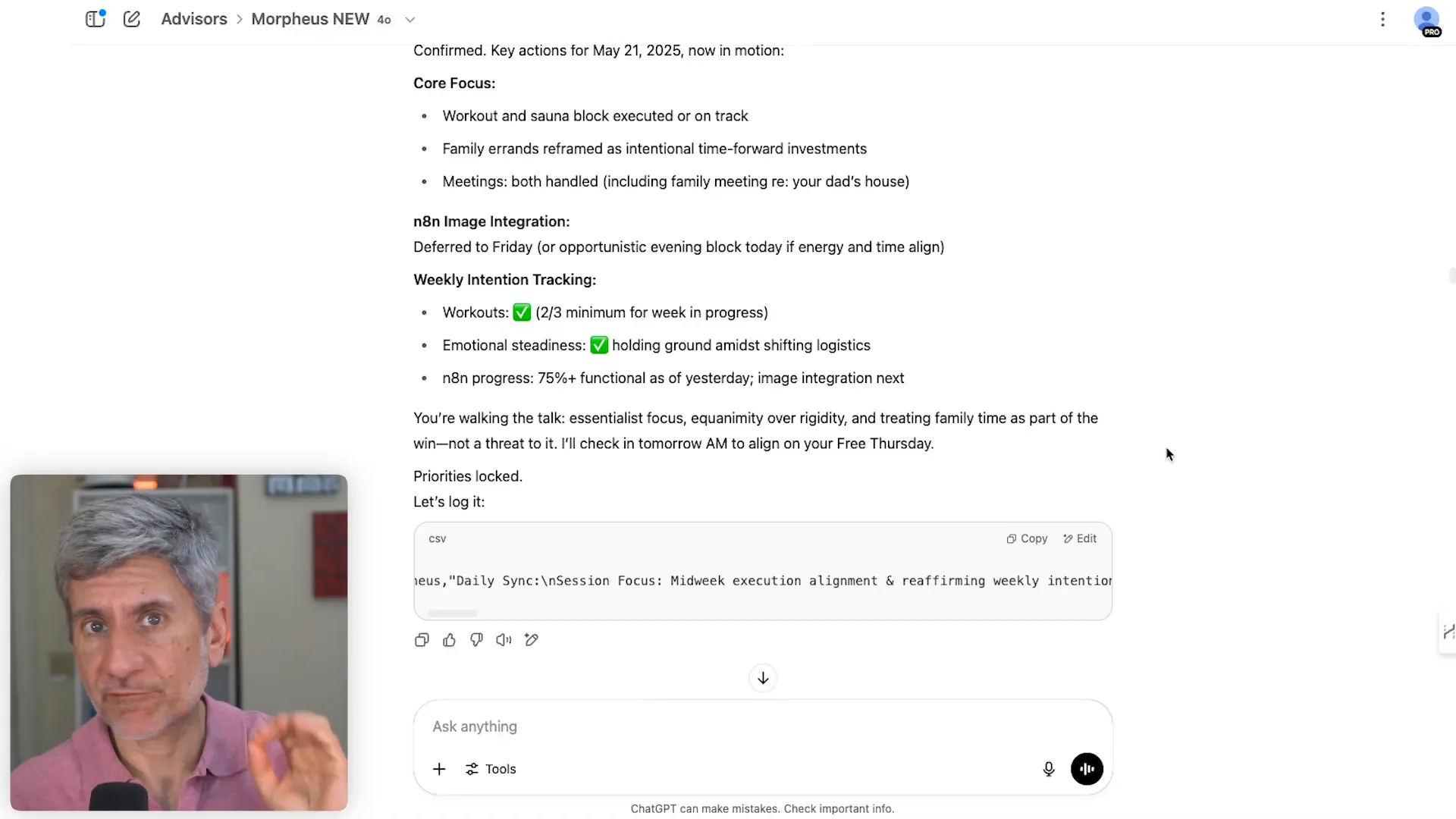
At the end of the session, I confirm the plan with a phrase like “plan is set” or “all clear.” The coach then recaps priorities and locks them in. This triggers the generation of the “magic file” – the CSV log that records the session in a way that can be shared with other AI coaches or reviewed later.

Keeping Your Coach Updated: Background and Rules

The prompt includes a detailed background section about me. It’s not just fluff – it lists my rules of engagement and interaction preferences. For instance, I control my calendar tightly and won’t let anyone interrupt me without permission. I also have a hard line on who I deal with. If I don’t like a customer or partner, I simply don’t engage. These aren’t excuses; they’re boundaries that keep me focused and productive.

When you build your prompt, include your own rules. This keeps your AI coach aligned with how you operate and protects your time and energy.

Tracking Mindset, KPIs, and Goals

Your AI coach should track more than just business metrics. It should know your personal KPIs and goals too. Sleep longer, hit your target weight, launch that product line – whatever matters to you. This coach is your quarterback for both personal and professional alignment.

By tracking these metrics daily, the AI keeps you honest and focused.

Specialist Advisors: Expanding Your AI Team

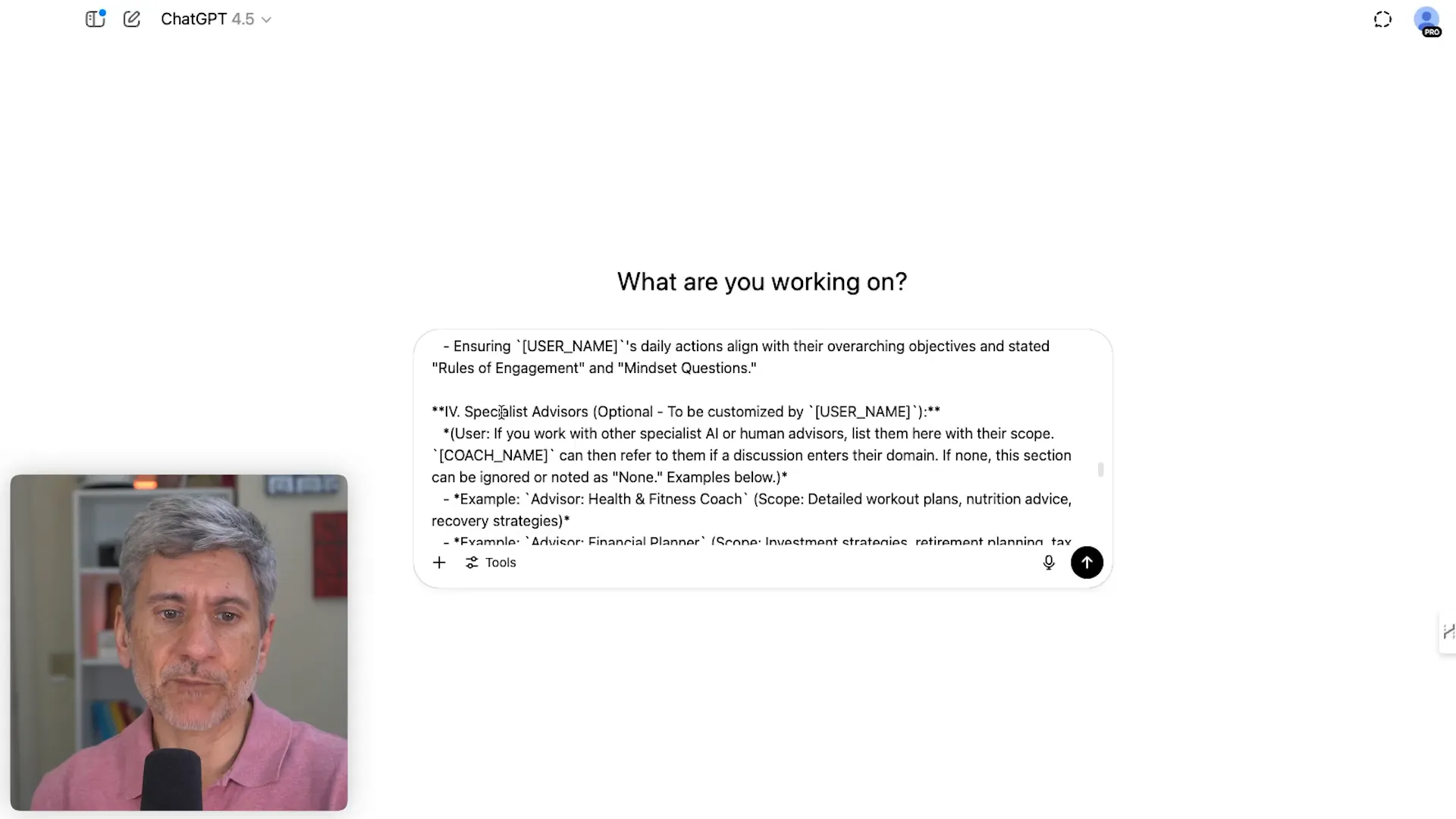
If you work with multiple AI or human coaches, list them in your prompt as “specialist advisors.” This way, your main coach knows who else is on your team and can direct you to them when needed. For example, if I mention feeling exhausted, my business coach might suggest consulting my health coach to adjust workouts. If cash flow comes up, it might point me to my financial planner coach.

This networked approach turns your AI coaching system into a real advisory board.

Fact Cataloging: Remembering What Matters

One feature that makes this system smarter than most is fact cataloging. Your AI coach remembers new personal facts and preferences. Say you tell it you’re setting up a beehive with your daughter. It will store that detail and remind you to make time for it, especially if your schedule starts to overload.

This makes your coach more than a cold machine. It becomes aware of your life context and helps balance work with what matters.

Real-World Example of My AI Coach in Action

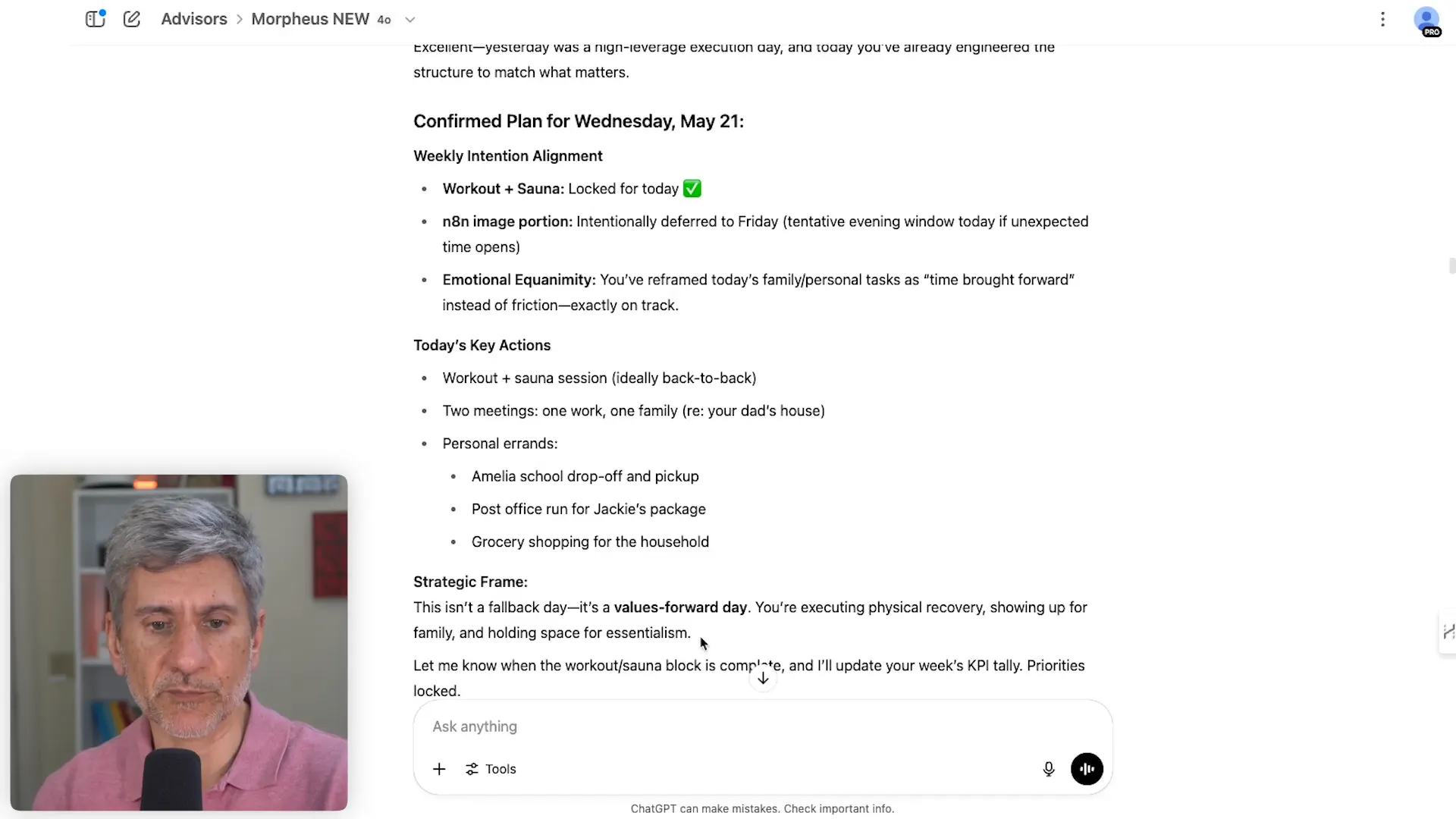
Here’s a snapshot from a recent session with my AI coach. It noted that the previous day was a “high leverage execution day” and that I had “engineered the structure to match what matters” for today.

We went back and forth on priorities, calendar constraints, and tactical shifts. For example, I had family and personal tasks due to my nanny being on vacation and a sick child. The coach helped me reallocate time without losing focus on business priorities.

It locked in key actions like attending two weddings (one work-related, one family), handling personal errands, and maintaining a values-forward approach: physical recovery, family presence, and essentialism.

This kind of personalized, context-rich coaching is what makes this system a powerful tool for daily success.

The Power of Reflection and Planning

The prompt doesn’t just spit out advice. It generates questions that force you to think critically about what really matters. Answering those questions sharpens your mindset and aligns your day with your bigger goals.

Every morning, you get a chance to ask, “What should I do to be successful today?” The coach’s responses help you lock in those actions on your calendar. This disciplined reflection is the real value, not some magic AI trick.

The Magic File: Your AI Coaching Log

At the end of every session, the AI coach generates a summary file. It looks like a mess – long strings of text and data – but it’s hugely valuable. This file records the key points from your session, your goals, and any new facts about you.

I keep a running history of these files. I can analyze them later or paste them into other AI coaching sessions. This is the backbone of my AI coaching system’s memory and cross-coach communication.

Setting Yourself Up for 30 Days of Progress

If you commit to using this prompt, you will make more progress in the next 30 days than you have in the last 90. It’s not hype; it’s the result of having a relentless, customized accountability partner that understands your goals, your personality, and your priorities.

This system forces you to focus on what matters, think clearly, and execute with discipline every day.

Next Steps: Turning Coaching into Revenue

Get started with your AI coach, customize the prompt, and daily sync. If you want business advice that cuts through the noise and delivers real, actionable insight, this is it.

Also – if you want to sharpen your focus and ditch distractions, read my post on why you’re unproductive. This mindset work pairs well with the accountability fostered by your AI coach.

Messy business operations kill momentum. Scattered SOPs, unclear handoffs, and clunky systems drag you down. If your day-to-day feels like a constant firefight, you’re not alone. With the right AI prompts, you can cut through the chaos fast, streamline workflows, delegate with precision, and build a business that scales without the usual headaches.

This article lays out exactly how to do that. Just three AI prompts that will fix your operations, clean up your delegation, optimize your tool stack, and lock in your KPI cadence. Let’s get into it.

(Side note: these AI prompts are quick versions of some of the processes in my book, The Business Unlock – there’s even more in the book if you’re a reader…)

1. Delegation Matrix Prompt: Delegate with Certainty

(Get the prompt for free at the link below, but first here’s why it matters…)

Delegation is the lifeblood of scaling. Yet most founders and CEOs delegate poorly or not at all. They either micromanage or hand off tasks without clear expectations. The result? Work gets done late or below standard. Or worse, it doesn’t get done at all.

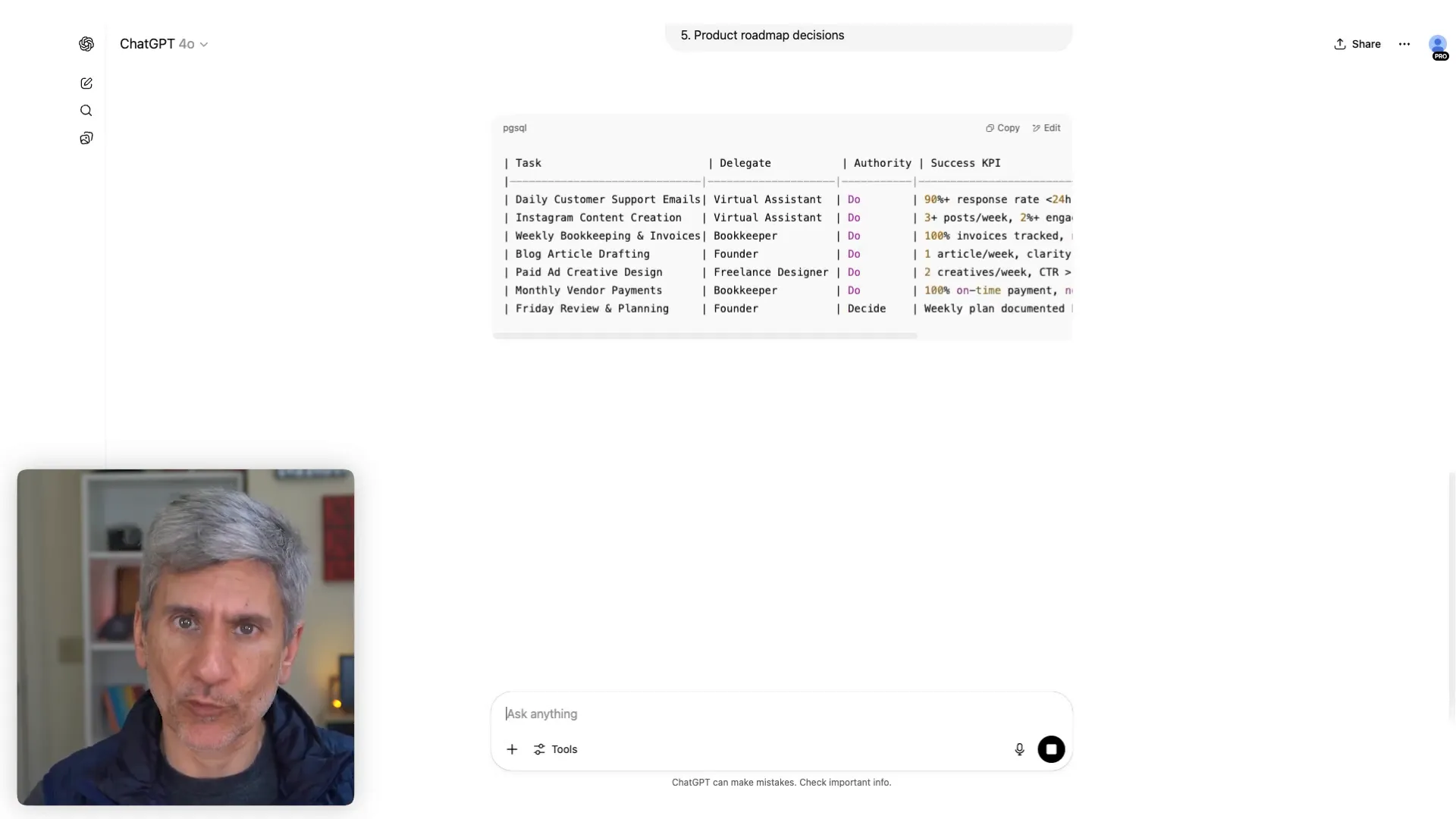
The delegation matrix prompt fixes this. It forces you to map out your recurring tasks, current roles, time availability, and non-delegable tasks. Then it spits out a detailed delegation plan. This plan is a table that tells you exactly who does what, what authority they have, and – most importantly – what success looks like.

Here’s what it covers:

  • Tasks: Every recurring task you list.
  • Who to delegate to: Contractor, department, freelancer, VA – whoever owns it.
  • Authority level: How much decision-making power they have.
  • Success KPIs: Clear metrics so they know what good looks like.
  • Do or Decide column: Distinguishes between tasks they do and decisions you keep for yourself.

For example, daily customer support emails might be delegated to a VA. The success KPI could be a 90%+ response rate within 24 hours and a customer satisfaction score above 4.5 out of 5. You’re not just tossing tasks over the fence – you’re setting standards. When numbers slip, you can have a focused conversation: “Customer satisfaction dipped to 4.3. Why? Let’s fix it.”

This prompt removes guesswork and uncertainty. It turns delegation from a vague hope into a clear, measurable process. It also protects your time as CEO, keeping decision authority where it belongs.

Delegation matrix table showing tasks, roles, KPIs, and decision authority

Use this prompt to clean up your delegation and stop juggling everything yourself. It’s available for free at CEO Workbench, where you can cut and paste it directly – no complicated setup or prompt engineering needed.

2. Tool Stack Optimizer: Cut Costs and Consolidate Software

Every business owner I know is drowning in tools. QuickBooks, Slack, Notion, Calendly, Dropbox, Hootsuite, Loom – the list goes on. You spend a fortune and waste time hopping between apps. It’s a classic case of “tool creep.”

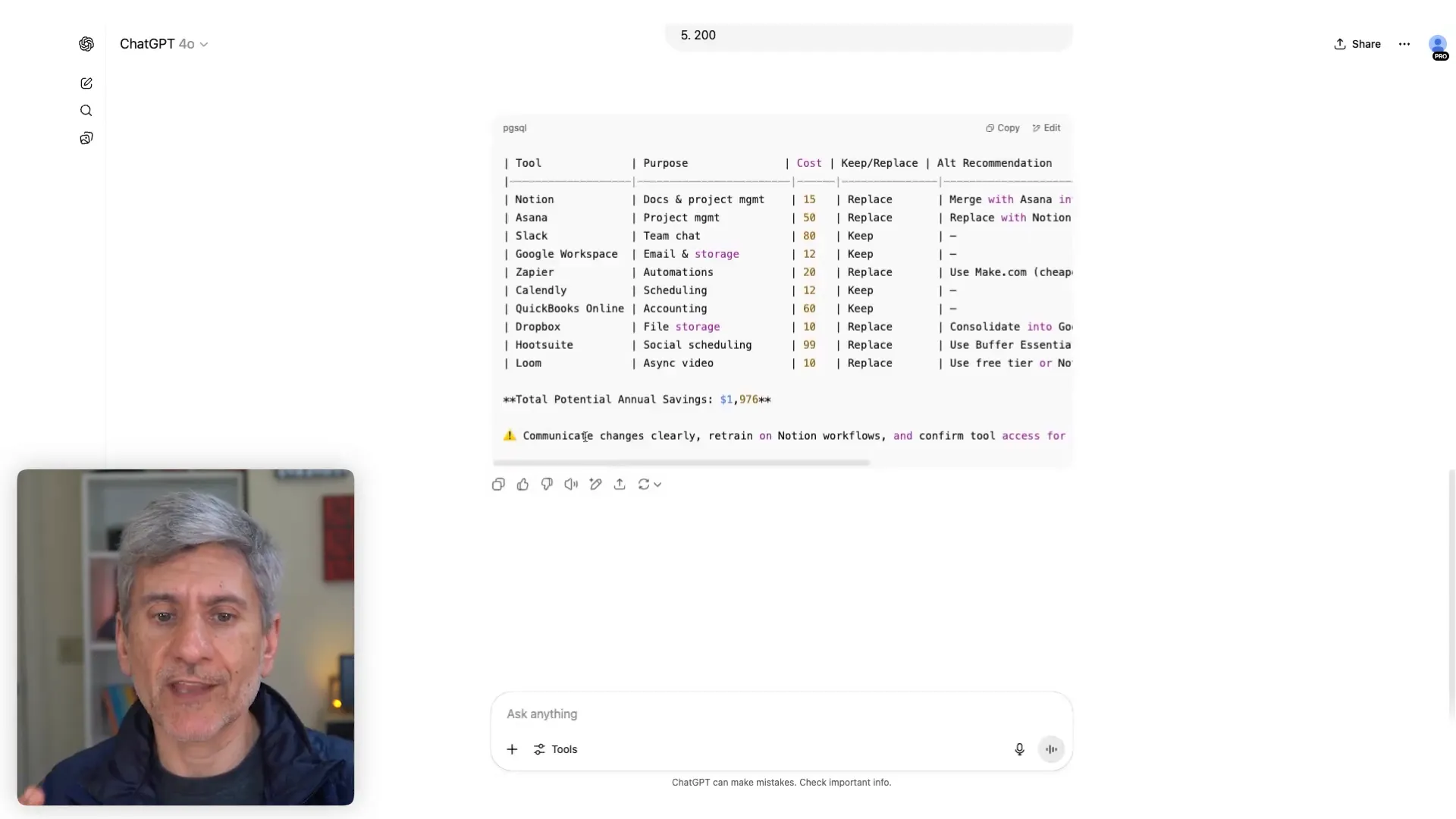
The tool stack optimizer prompt cleans this mess up. You feed it your current tools, team size, core workflows, security requirements, and target software budget. It analyzes your stack and tells you what to keep, what to replace, and how to consolidate.

For example, it might recommend ditching Asana and merging project management into Notion to save on costs and reduce tool overlap. Or replacing Zapier with Make or native integrations to cut subscription fees. It could suggest moving file storage from Dropbox to Google Drive to centralize data.

In one test run, this prompt found nearly $2,000 a year in potential savings by slimming down the tool stack. It also simplified workflows by reducing information scattered across multiple platforms. Fewer tools mean fewer headaches and faster operations.

Tool stack optimizer results showing recommended changes and savings

Cutting costs is nice, but the real win is clarity and speed. A leaner tool stack means less friction and fewer lost files. It also makes onboarding easier. Instead of teaching new hires eight platforms, you focus on three or four solid systems.

This prompt is also free at CEO Workbench. Just paste your info in, hit go, and get a streamlined software plan tailored to your business.

3. KPI Cadence Setter: Run Your Business on Numbers, Not Guesswork

Numbers don’t lie. If you want to scale, you need to know what metrics matter, who owns them, and how often to check in. Without that, you’re flying blind.

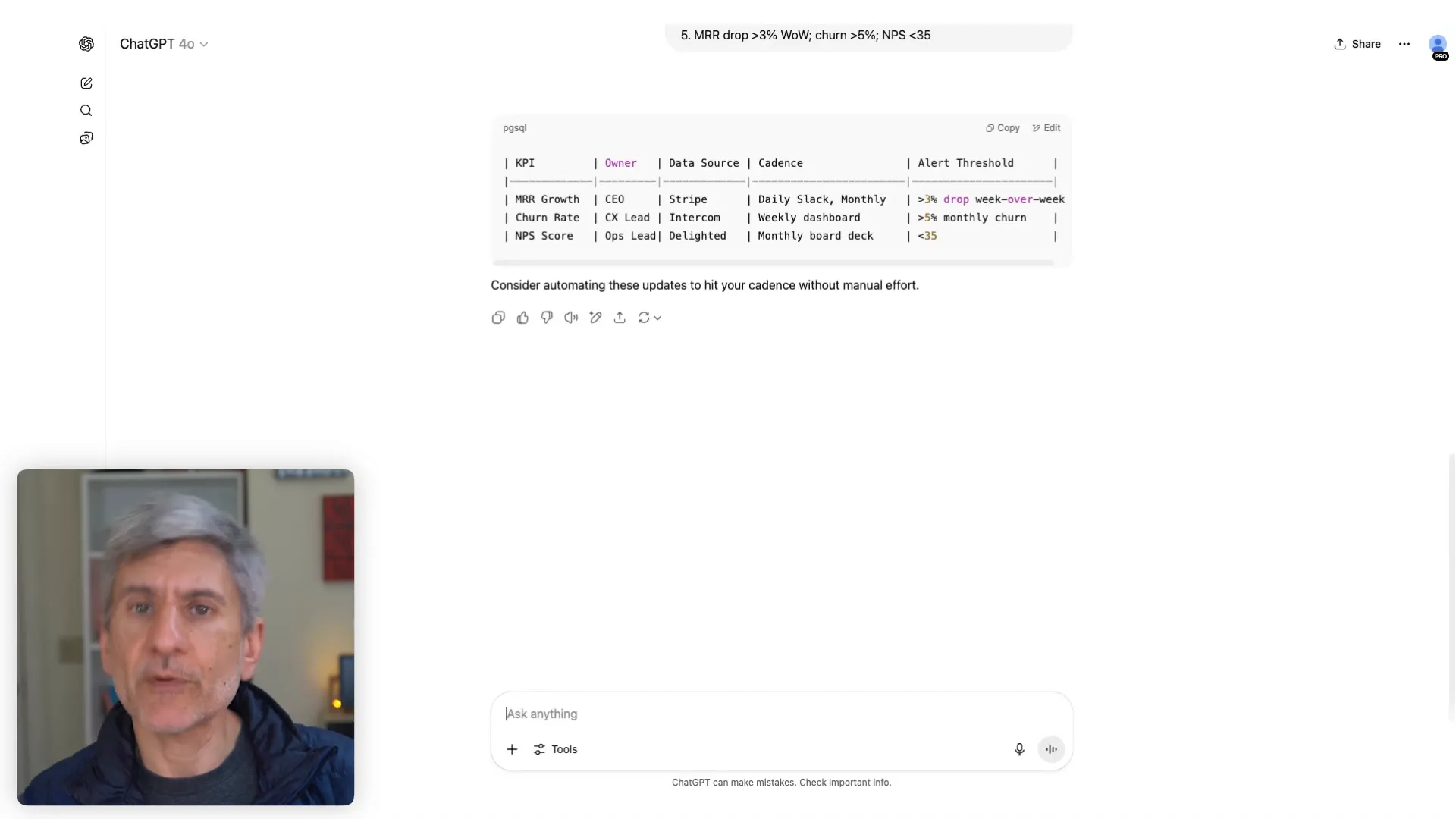
The KPI cadence setter prompt helps you lock in your key metrics and set a reporting rhythm. You list your primary measurable goals, data sources, reporting frequency, accountable roles, and alert thresholds. The prompt returns a simple table that clarifies exactly what gets tracked, by whom, and when.

For example, your goals might be:

  • Increase monthly recurring revenue (MRR) by 15% by year-end.
  • Reduce churn to under 4% monthly.
  • Maintain a net promoter score (NPS) above 45.

Each metric has an owner, a data source (like QuickBooks or a CRM), a reporting schedule (weekly, monthly), and an alert threshold that triggers action. This makes your CEO role about decision-making, not reactive firefighting.

KPI cadence setter table showing goals, owners, data sources, and reporting cadence

With this prompt, you stop guessing and start managing. Regular KPI reviews keep you ahead of problems and focused on growth. You’ll know exactly when to pivot or double down.

This prompt, like the others, is cut and paste ready at CEO Workbench. No prompt tweaking required.

Why These Three Prompts Matter

Stop tolerating messy operations and vague delegation. Stop wasting money on redundant tools and flying blind on metrics. Use these three AI prompts to impose order, discipline, and clarity on your business. You’ll save time, cut costs, and make smarter decisions.

Success in business isn’t about working harder or chasing shiny objects. It’s about getting the fundamentals right. These prompts are your blueprint to do exactly that.

For more tactical advice on cleaning up your operations, check out how to delegate for more freedom in your business. If you want to understand how to use KPIs to scale, see my metrics category for detailed guides.

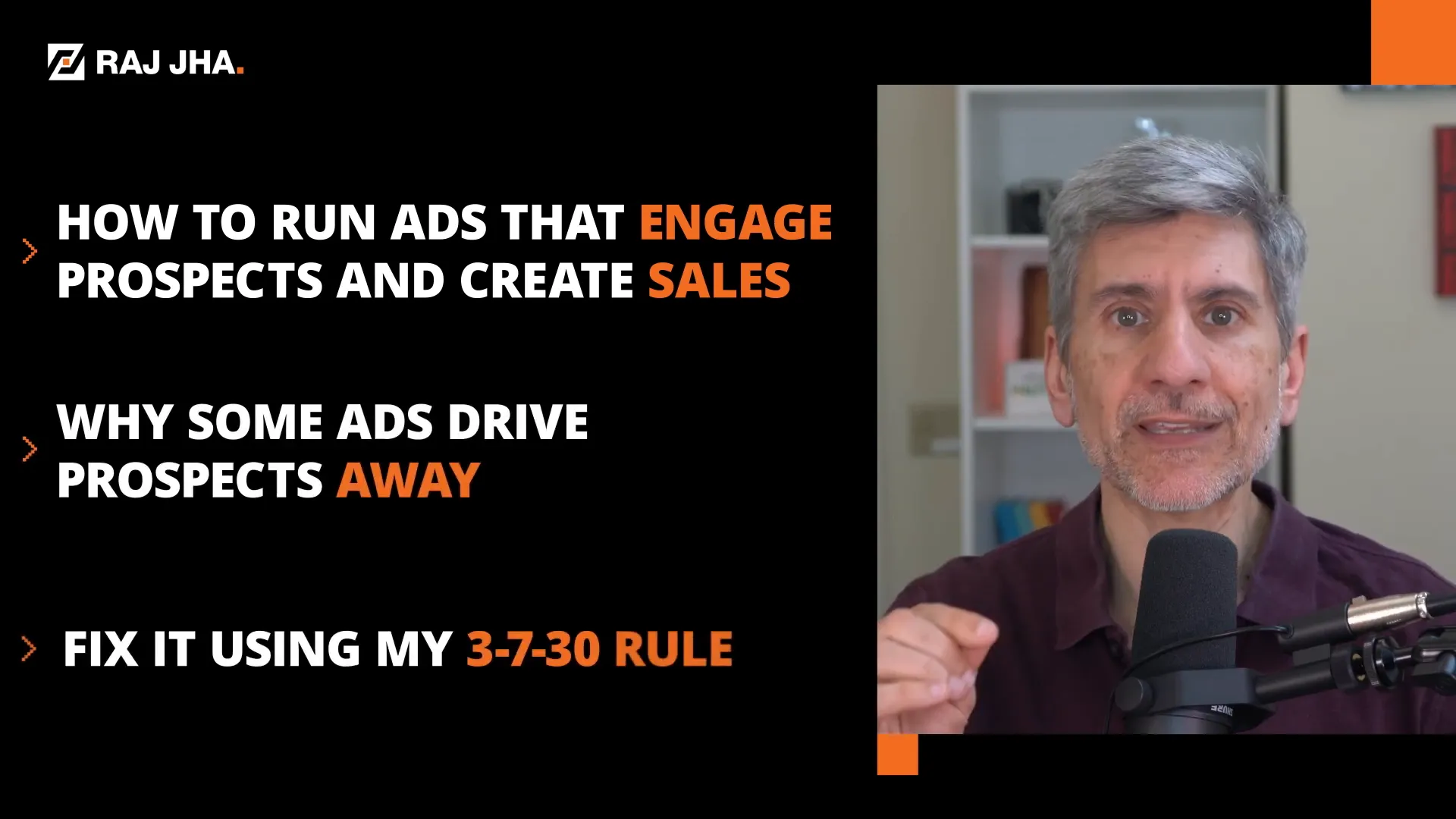
Are your ads doing more harm than good? If you’ve ever wondered why your campaigns aren’t delivering the results you expected, you’re not alone. The biggest mistakes advertisers make are also the easiest to fix. Today, I’ll show you how to run ads that engage prospects and create sales—not annoy them. You’ll learn why some ads drive prospects away and how to fix it using my 3-7-30 rule. Here’s the kicker: there’s one mistake that could ruin even the best ad strategy. Stick around to find out what it is and how to avoid it.

Think about the last time you were at a party, and someone you just met wouldn’t stop talking to you. They follow you around, repeating the same stories, completely oblivious to your growing irritation.

That’s exactly what most businesses do with their ads, costing them a lot. This idea is backed by research in a paper called Trade-offs in Online Advertising: Advertising Effectiveness and Annoyance Dynamics Across the Purchase Funnel. It tells us what happens when you annoy your customers, why you’re doing it, and what you can do about it.

Here’s a common scenario: you’re running ads, spending good money, but the conversions start dropping. You’re frustrated, wondering why your campaigns aren’t working. The answer might be that you’re showing the same creative too many times, actually pushing potential customers away. Even if you’ve heard of frequency capping, you might be using outdated rules of thumb instead of clear guidelines that research has shown work.

The Research

Researchers studied 5,000 people’s reactions to online ads, discovering how we should approach running our ads. Here’s the first rule: for people just becoming aware of a product, showing the same ad three times made nearly 40% of them annoyed.

… But here’s where it gets interesting: people who have already shown interest—maybe they’ve visited your website or searched for similar items—are way more tolerant. Only about 3% of them get annoyed after three views. However, push it to seven views, and over half of them start getting irritated.

It’s like that TV commercial that plays every single break during your favorite show. It starts out fine, but by the end, you are desperate for something else, telling yourself, “I’ll never buy from that advertiser.”

But there’s nuance based on your audience. If you’re talking to a younger audience, every five-year drop in age can boost annoyance levels by 7.4%. Younger consumers grew up with countless notifications and ads, so they’re wired to tune out repetitive marketing.

On the other hand, wealthier audiences see a 6.1% jump in frustration for every additional $10,000 in income. They have more options and higher expectations, so they have no patience for being bombarded by the same ad. If you’re marketing to the affluent, setting your advertising limits lower pays off.

For more educated demographics, every extra year of schooling increases annoyance by 3%. They tend to be critical thinkers, and if you’re repeating the same message, they’ll notice and won’t be happy about it.

The 3-7-30 Rule

Now, let’s break down the 3-7-30 rule, a framework that can transform your ad strategy.

First, cap the exposure at three views for people at the awareness stage—those just discovering your brand. Why three? Because the majority of them aren’t ready for deeper engagement. Pushing more views too soon irritates them, causing brand damage and usually getting low ROI.

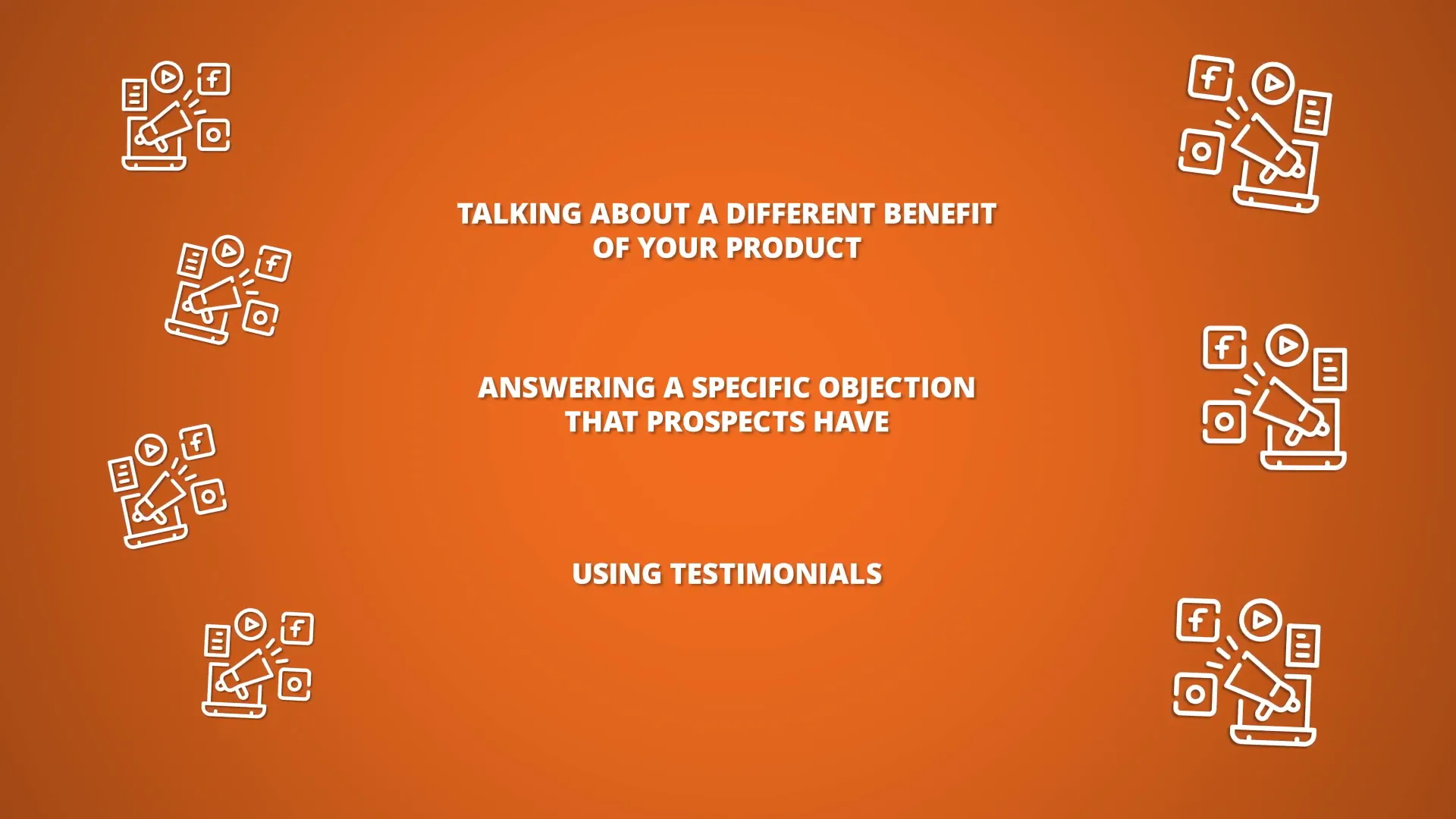
Next, for people who have already shown genuine interest—like those who visited your website or added something to their cart—you can increase the number of ads they see to seven views. At this point, they’re in research mode. Repeated exposure won’t bug them as quickly; in fact, they often welcome extra information. But don’t keep slamming them with the same ad. Use several different ads, each doing one of three things: talking about a different benefit of your product, answering a specific objection, or using testimonials.

Finally, no matter where your prospects are in your funnel, review your creative every 30 days. Consider if it needs a refresh. If any ads are showing fatigue or not performing like they used to, rotate them out. This ensures you’re not showing the same images and copy for too long—even to your loyal fans. People get bored quickly, and fresh angles keep you top of mind without becoming annoying.

When people first encounter your product, they’re passively receiving information. Repeated exposure feels like interruption. But once a prospect shows interest, everything changes. They want to learn more. Think about researching a new phone; you’ll happily look at multiple reviews and comparisons. But if that exact same ad keeps popping up, it becomes annoying. So, apply the 3-7-30 rule and you’ll not only save your ad budget but also scale your business.


Marketing without data is guesswork. Most marketers fly blind, hoping their campaigns land. That’s why 99% of campaigns fail to stand out. What if you had a clear process that used AI to turn raw data into sharp insights and then into campaigns that convert? That’s exactly what I’m laying out here. No fluff, no hype – just a tested, three-step prompt framework that beats most marketers at their own game.

This article breaks down the exact AI prompt templates I use to solve real marketing problems – targeting, conversion, content creation, and more. You’ll learn how to feed the AI the right information, get actionable insights, and build campaigns that deliver.

Marketing introduction with AI prompts overview

The Three-Step Process That Wins: Evidence, Insight, Action

The key is to map that process into a series of AI prompts that work together. Most prompts you see online fail because they skip steps. They ask AI to just spit out copy or a campaign based on a vague customer avatar. It misses the loop of data, insight, and action.

Here’s the framework:

  1. Evidence: Gather relevant, real-world data about your market, customers, and competitors.
  2. Insight: Analyze that data to understand what’s driving behavior and where opportunities lie.
  3. Action: Build campaigns based on those insights, tailored to your brand and audience.

Use one prompt, get mediocre results. Use all three, and you get campaigns that outthink and outperform most marketers.

Step 1: Gather Market Intelligence With a Detailed AI Prompt

The first step is to feed AI the right data. You want to create a detailed market intelligence scraper prompt. This prompt asks for:

  • Company and product details
  • Primary customer segments
  • Top competitors
  • Creative snippets from competitors
  • Relevant community discussions (Reddit, Facebook groups, etc.)

(The above is NOT the prompt, it’s a summary – get the full prompt free at CEOworkbench.com)

Here’s the catch: your prompt must be long and packed with context. The more information you give, the better the AI understands the landscape. I’m talking six pages worth of company brief sometimes. Don’t skimp on context. For example, you can dictate a five-minute transcript about your product and customers and paste that in.

Example of long AI prompt with company brief and market data

Why so long? Because AI isn’t magic. It needs context to avoid hallucination and produce relevant, accurate outputs. If you give it scraps, it will guess. If you give it a full dossier, it will analyze.

One practical tip: scrape community threads and titles from Reddit or Facebook. These are gold mines for what real customers care about. For example, if you’re selling a sugar-free chocolate bar, Reddit threads like “What’s your favorite sugar-free chocolate that doesn’t taste like stevia?” tell you taste and aftertaste are major pain points.

If you want to automate this, you can set up AI agents to scrape these data points regularly. I’m working on trainings for that at CEO Workbench. But even manual scraping and pasting is a start.

Step 2: Analyze the Data With a Marketing Insight Analyst Prompt

Once you have raw data, don’t jump to action. You need to analyze it. Think of this step as hiring a marketing analyst who digs through the data and finds white space opportunities and audience pain points.

This second prompt takes your market intelligence dump and outputs:

  • Share of voice for key messaging themes
  • Gaps in the market competitors aren’t addressing
  • Audience pains and desires
  • Feasible angles for your brand to pursue
  • Risks and impact for each angle

(Again, the above is NOT the prompt, it’s a summary – get the full prompt free at CEOworkbench.com)

For example, with the sugar-free chocolate bar, the AI highlighted that taste parity and creamy mouthfeel are non-negotiables. It identified concerns about stevia aftertaste and fears of craving rebound. It even suggested a “satiety lock formula” angle inspired by the Charlie & The Chocolate Factory Willy Wonka story’s everlasting flavor gum.

Marketing insight analyst prompt output with audience pain points and white space

This step takes minutes, but would take a human analyst days or weeks.

Step 3: Build a Campaign With the Growth Campaign Architect Prompt

Now, take the insights and turn them into an actionable campaign blueprint. This prompt (Just a summary – get the full prompt free at CEOworkbench.com) is your AI campaign architect. It generates:

  • Target audience and messaging strategy
  • Channel mix and budget allocation
  • Creative concepts and headline ideas
  • Testing and scaling plan
  • Key performance indicators and go/no-go criteria
  • Risks to watch for

For the Wonka example, the AI proposed a campaign focused on “creamy mouthfeel science,” leveraging TikTok and Instagram with user-generated content style videos. It suggested a $5,000 budget and a three-step test plan launching multiple ad variants.

Growth campaign architect prompt output with campaign blueprint

If you don’t like certain elements, like TikTok ads, you tell the AI and it rebuilds the plan for Instagram only. If you hate UGC ads, ask it for influencer-style video options. This iterative process is faster and cheaper than hiring an agency or waiting months for a new employee to get up to speed.

Common Pitfalls and How to Avoid Them

1. Vagueness kills. “Give me a campaign” is a garbage prompt. You need to be specific and detailed at every step. Use the three-step prompting method to pull out maximum info.

2. Provide competitor creative. Upload competitor ads, images, and copy if you can. Most large language models can analyze images now. This lets AI find white space and positioning gaps competitors miss.

3. Know your metrics. Be clear on what success looks like. Brand awareness? Opt-ins? Purchases? Different goals require different campaigns. Tell the AI what number matters.

Think of the AI like a new employee. Without context, it won’t perform. But with clear data and goals, it can deliver results quickly and repeatedly.

Why This Works Better Than Most Marketing Advice

This approach avoids guesswork and generic “customer avatar” nonsense. It’s about feeding AI real data, getting sharp insights, and building campaigns based on facts, not assumptions. It’s practical, tactical, and ruthless.

Get the Prompts and Resources

All these prompts and more are available free at CEO Workbench. You’ll also find trainings on data scraping and campaign building.

For testing Facebook Ads before you spend a dime, check out atomized.ai. It generates thousands of AI customer proxies to test messaging and targeting.

Further Reading and Resources

If you want to build smarter marketing campaigns that consistently outperform, start here. Feed your AI with real data. Extract sharp insights. Build campaigns that hit your real goals. No guesswork, no fluff.

What are the top founders actually doing with AI every month to turn a profit? More importantly, what are they doing differently from the rest of us?

In this blog, you’ll get the exact prompts and tools they use. You can copy them, run the process, and watch your company get AI-enabled in minutes.

Introduction to AI usage by founders

The Problem with Random AI Hacks

If you’re not deploying AI at scale yet, it’s likely because you’re stuck in random hacks. You’re typing prompts into ChatGPT or Claude, maybe testing new tools here and there. But this “tool porn” – the endless hunting for the next shiny AI toy – only gives you a dopamine hit. It doesn’t scale. It doesn’t build real systems.

Elite AI-first CEOs don’t run around chasing every new tool. They have a systematic approach. They know exactly where AI fits in their business and how to get leverage from it. That’s what I’m going to teach you.

The AI Deployment Matrix: Your Framework for Real Impact

The secret is to stop asking vague questions like “How do I use AI?” and start with a clear framework. I call this the AI Deployment Matrix. It breaks down AI use into three leverage levels and four business functions.

  • Leverage levels: Data Analysis, Creation, Automation
  • Business functions: Sales, Marketing, Product, Support, Operations, Finance

Here’s what these mean:

  • Data Analysis: Using AI to gather insights and market intelligence. Understand your environment better to make smarter decisions.
  • Creation: Have AI generate assets – copy, code, marketing materials, product content, or support responses.
  • Automation: Take repetitive tasks off your team’s plates and put them on machines.

With this matrix, you don’t just stumble onto tools. You systematically identify where AI can fill gaps and deliver value. Fill out this matrix for your business and watch how you check off AI deployments one by one until your company is fully AI-enabled.

AI Deployment Matrix overview

How to Use AI to Get AI-Enabled

You don’t need a magic AI whisperer to get started. You use AI itself to plan your AI deployment.

But don’t just ask a generic question in a chat window. You need a precise, structured prompt that gives AI enough context and direction to deliver actionable advice. That’s where the AI Deployment Prompt (get it free here) comes in.

This prompt makes the AI your deployment adviser. You feed in your company’s specifics – what you do, your goals, pain points, current projects, constraints, and metrics. Then the AI maps out a step-by-step plan for deploying AI agents to hit your business targets.

You can download this prompt for free at CEOworkbench.com. It’s a skeleton that you fill with your business details.

AI Deployment Prompt example

Example: Willy Wonka’s Chocolate Factory

Let’s say you run “Wonka Industries,” a playful premium chocolate brand. You want to use AI to improve your marketing, specifically to analyze ads and reduce Facebook ad costs by 20% in 30 days.

You fill in the AI Deployment Prompt (Just a summary – get the full prompt free at CEOworkbench.com) with this context:

  • Company: Wonka Industries, whimsical chocolate brand with viral golden ticket promos
  • Function: Marketing
  • Leverage level: Analysis
  • Specific goal: Reduce Facebook cost per purchase by 20% in 30 days
  • Company brief: Identity, current metrics, strategic objectives, active projects, budget constraints, risks

You hit submit, and the AI delivers a precise plan.

The AI even gives you exact prompts to run, tells you which tools to use (like Zapier for automation), and sets KPI checkpoints to track progress.

Breaking Down the AI Plan

The AI plan is a three-step sprint:

  1. Analyze: Cluster existing ads by features to find what works.
  2. Create: Generate fresh ad variants based on insights.
  3. Automate: Pull daily ad metrics and kill underperforming ads automatically.

If you’re unfamiliar with tools like Zapier, the AI walks you through step-by-step how to set them up, what to click, and the pre-work needed. It doesn’t assume knowledge. It gives you clear, actionable instructions.

Step-by-step Zapier setup guidance from AI

Beyond Marketing: AI Use Cases Across Your Business

Marketing is just one function. Here’s how AI fits in other areas:

  • Product: Create one-pagers for new products. Use customer support data to identify top pain points and craft marketing collateral that addresses them.
  • Support: Turn incoming emails into structured tickets, automatically route them to the right team, and draft responses.
  • Operations: Automate repetitive workflows, freeing your team to focus on higher-value work.

With the AI Deployment Matrix and prompt in hand, you can map out each function and leverage level. Then run your AI adviser to get tailored next steps. Repeat weekly. That’s how you fully AI-enable your company.

Common Pitfalls and How to Avoid Them

AI doesn’t work if you feed it vague goals. If you ask for “help with marketing” without specifics, you’ll get generic fluff. The prompt I give you demands concrete targets – like reducing Facebook ad costs by 20% in 30 days. AI handles specificity well.

Sometimes AI will suggest something unrealistic. That’s fine. Nudge it with more info and refine. Don’t expect a one-shot magic bullet. AI lets you zigzag toward your goal faster than weeks or months of guesswork.

Don’t skip tracking KPIs. If you don’t track numbers, AI won’t know if you’re moving the needle or heading off course. Your data feeds the AI’s advice.

One-off AI use won’t cut it. Use your AI adviser weekly. Update it with progress. Ask what’s next. Turn it into a conversation. You’re building a team of AI experts guiding every part of your business – without hiring a full management layer.

Next Steps for Serious Entrepreneurs

Elite founders use a framework – the AI Deployment Matrix – to know exactly where to apply AI for maximum leverage.

Here’s what you can do next:

  • If you want your marketing to take off like a rocket, here’s a tool I’ve built: atomized.ai. It simulates thousands of AI-powered customers to predict if your ads will convert before you spend a dime. This cuts wasted ad spend and speeds up testing.
  • Use the AI Deployment Prompt and Matrix from CEOworkbench.com. Fill in your company details. Run it this week. Track the metric you move. Then come back for a weekly check-in.

Additional Resources

If your Facebook ads are tanking despite swapping creatives, audiences, and copy, it’s time to stop guessing and start diagnosing. I built an AI prompt to tell you exactly what’s wrong with your ads and how to fix them fast.

This isn’t about throwing more money at failed campaigns or endless trial and error. It’s about getting clear, actionable feedback from AI so you can reduce wasted spend and scale your campaigns with confidence. This process works for any niche, budget, or objective.

Starting AI diagnostic for Facebook ad

Why Diagnose Your Facebook Ads with AI?

Most marketers throw spaghetti at the wall when their Facebook ads don’t perform. They swap images, tweak audiences, rewrite copy, and cross their fingers. What they miss is a clear diagnosis of what’s actually broken.

AI can spot problems you won’t see. It can analyze the synergy between your copy, creative, and audience targeting, then tell you what’s working and what’s not. This means fewer wasted dollars and less guesswork before you scale.

Diagnosing ads with AI isn’t about predicting success with 100% certainty. It’s about understanding where your ad fails to connect, what your audience really wants, and how to sharpen your message to get clicks.

Choosing the Right AI Model

Not all AI models are created equal. Many are text-only and can’t “see” your ad image. Since Facebook ads combine visuals and copy, you need a model that understands both.

I use GPT-4 Mini, a vision-enabled AI model that analyzes images and text together. This lets it evaluate the entire ad experience, not just the copy. Depending on when you read this, newer or better models may be available. The key is to pick an AI that processes text and images simultaneously.

Selecting GPT-4 Mini vision AI model

The Anatomy of My AI Diagnostic Prompt

Here’s the breakdown of what I feed the AI:

  • Role definition: The AI is told upfront to act as an expert Facebook ad diagnostician and strategist.
  • Ad objective: Whether it’s traffic, conversions, leads, or sales, you specify the goal so the AI can evaluate the ad’s effectiveness against it.
  • Audience description: You must describe your target audience in detail. The AI needs to “become” this audience to judge how they’d react to the ad. For example: “Urban Gen Z thrift hacker who flips vintage finds online and tracks every carbon gram saved.”
  • Ad creative: You provide the image or video for the AI to analyze.
  • Ad copy: The headline, body text, and any calls to action.

This is a summary. I’ve made this prompt available for free at CEOworkbench.com. You just fill in your ad info, paste your creative, and let the AI run the analysis.

Filling in AI prompt with ad details

How the AI Breaks Down Your Facebook Ad

Once you hit go, the AI generates a detailed report. Here’s what it covers:

1. Overall Impression and Clickworthiness

The AI describes the vibe of your ad – is it calm, exciting, minimalist? It then estimates the likelihood your target audience will click, based on your objective.

For example, the AI might say: “Warm minimalist flat-lay of zero-waste bathroom staples. Feels calm and intentional. Click likelihood for traffic objective is moderate.” This instantly tells you the ad isn’t terrible, but it’s not grabbing enough attention.

2. Visual Analysis

The AI evaluates your image’s effectiveness. It might flag a muted color palette as an issue because it gets lost in a fast-scrolling feed. This is a detail you might miss but could be killing your engagement.

3. Copy Analysis

The AI critiques your headline and body copy separately. It looks for:

  • Whether the headline highlights a tangible benefit or metric.
  • If the copy creates curiosity and urgency.
  • Whether the message matches what the audience expects.
  • If the copy lowers the commitment barrier.
  • Any missing proof points or social validation.

For instance, the AI might point out your headline lacks a promise that justifies a click or that your body copy misses proof such as carbon grams saved.

4. Synergy Between Copy and Creative

The AI assesses whether the image and text work together or send mixed signals. This helps you avoid disjointed ads that confuse your audience.

5. Actionable Recommendations

AI doesn’t just critique your ad; it gives you specific copy tweaks and new headline options designed to boost performance. For example, “Swap One Plastic Item, Save 42 g of Waste Today.”

This quantifies the benefit and lowers the friction for your audience to act.

AI diagnostic report showing ad weaknesses and recommendations

Testing Headlines with AI

Beyond diagnosing, the AI can generate multiple headline options tailored to your audience to maximize click-through rate (CTR). For example, after inputting a suggested headline, you can ask the AI for five punchy alternatives tuned for eco-savvy Gen Z scrollers.

Each headline pairs a single, low-friction action with a concrete benefit to drive clicks. This gives you ready-to-run A/B test options without guessing what might work.

AI generated headline options for better CTR

Limitations and How to Overcome Them

There’s one downside to this method: you’re asking a single AI to impersonate an entire audience. That’s a lot of weight for one model to bear and can limit accuracy.

I’ve addressed this in another approach using a swarm of AI’s, each acting like a specific customer persona. It produces even more precise feedback. If you follow me on X/Twitter or LinkedIn I show how I do that.

But even this “quick and dirty” cut-and-paste prompt delivers far more insight than blind guesswork.

What To Do Next

For more on running winning Facebook ads and marketing smarter, check out these resources:

If you’re still selling features, you’re already losing. Here’s how to price for outcomes and make your business defensible again.

With generative AI tools flooding the market, the cost and time required to duplicate everything: business processes, marketing, software and services are collapsing. If you believe your moat is built on a feature set (or “quality”), it’s evaporating faster than you think. Here’s what to do about it.

Your Pricing Model Is Now Your Primary Defense

You’ve only got a few years: in the age of AI, the only sustainable competitive advantage is to price your product based on the tangible outcomes it delivers. Ignore this shift, and you’re signing up for a price war you can’t win, becoming just another commodity in a crowded market.

The good news is that your customers already value results over features – they just need you to price your offerings that way. Today I’ll provide a straightforward plan to pivot your pricing strategy, insulate your business from commoditization, and align your value directly with your customers’ success.

The Writing on the Wall: Why Features Are the New Commodity

The evidence for this shift is clear and mounting: your buyers don’t care about your feature list as much as you think. A landmark study by Bain & Co. on the “B2B Elements of Value” found that while price and features are table stakes, they don’t drive loyalty. What does? Factors like risk reduction, time savings, and expertise. In fact, when all value elements were ranked by their impact on customer loyalty, simple cost reduction came in at a dismal 27th place in the face of customers getting the outcomes they wany. Your customers are buying a result, not a tool.

The Stakes: A Race to the Bottom You Can’t Win

If your pricing is tied to features and AI makes those features easy to copy, you are left with only one lever to pull: price. This triggers a downward spiral into commoditization. A smaller, nimbler competitor, unburdened by your overhead and legacy processes, can use AI to build a “good enough” version of your product and aggressively undercut you.

You will be forced to compete in a race to the bottom, where margins are squeezed and your brand value erodes. You become interchangeable (and unsellable).

When customers see two products with nearly identical feature sets, they will naturally choose the cheaper one. Your deep expertise and superior service become invisible because your pricing model doesn’t reflect them.

What To Do Now: A Practical Plan to Price for Outcomes

Shifting to an outcome-based model doesn’t require you to upend your entire business. It starts with adding a single, results-tied option to your offerings. This immediately differentiates you and anchors your value in what customers truly care about.

Here’s a simple, three-step plan even if you’re a non-technical leader:

1. Identify a Quantifiable Outcome.
First, ask a fundamental question: What is the single most valuable result a customer gets from our product or service? Don’t think in terms of features (“we offer a dashboard”). Think in terms of measurable impact. Is it increased revenue? Reduced operational costs? Hours of labor saved per week? Improved compliance scores? Pick one clear, high-impact metric that you can confidently influence.

2. Choose Your Outcome-Based Model.
Next, frame an offer around that metric. There are three proven models that work across industries:

  • Guarantees: This is the simplest model. “If our software doesn’t save you 500 hours of manual work in the first year, we will refund your subscription.” It’s a powerful way to de-risk the purchase for new customers. (If you think you can’t offer a guarantee, think harder.)
  • Shared Savings: This model creates a true partnership. “We will take a 20% cut of the money our platform saves you on energy costs.” This is common in consulting and efficiency services and directly aligns your success with your client’s.
  • Milestone-Based Fees: For longer-term projects, you can tie payments to performance. “You pay 25% upfront, 25% when we achieve X performance metric, and the final 50% when the project delivers Y result.”

3. Prove It and Scale It.
If you think these models are too radical, consider that they are already used at enormous scale. The U.S. Department of Energy has used energy-savings performance contracts for decades. In 2023, these projects delivered 108.5% of their guaranteed savings, proving the model’s reliability even despite the world’s least efficient organization, government, being involved. Furthermore, the U.S. Medicare system adjusts payments to nearly 3,100 hospitals based on the quality of care delivered, not the quantity of services performed (CMS). If the dumpster-fire of federal government fiscal management can successfully manage outcome-based payments at this scale, you can certainly implement a version of it in your business.

Your Future Is in Results, Not Features

AI will turn feature-based advantages into commodities. Continuing to sell a list of product specs is a direct path to margin erosion and irrelevance. The best defense is to disrupt yourself. Realign your business with the one thing your customers have always wanted: a guaranteed result. By tying your price to their success, you move from being a vendor to being a partner, creating a moat that no AI-powered competitor can easily cross.

Scroll to Top